Showing posts with label Tokyo. Show all posts

Monday, March 15, 2010

How to Create Your Own Panoramic Photo

Throughout my limited travels, I often take lots of nice scenic photos that eventually end up in the digital storage. From time to time, I look through them, wishing that I had an ultra wide angle capturing the beautiful scene in front of my eyes. Maybe it's time to invest in a fisheye lens. However, an economic solution is to create my own panoramic photo without spending a dime.

I recently read an article from Photo Life, a high quality photo magazine, on photo merging technique from its February/March issue. It highlights tips and guidelines on creating a true panoramic photo from several similar scenic shots. I tried them, and absolutely loved them. Here we go. I'm going to share what I've done and the steps I took with you. Hope you'll find them useful in your own photo creation. I used Photoshop CS4 photo editing software. You probably can achieve the same results using older version of Photoshop or other photo editing software.

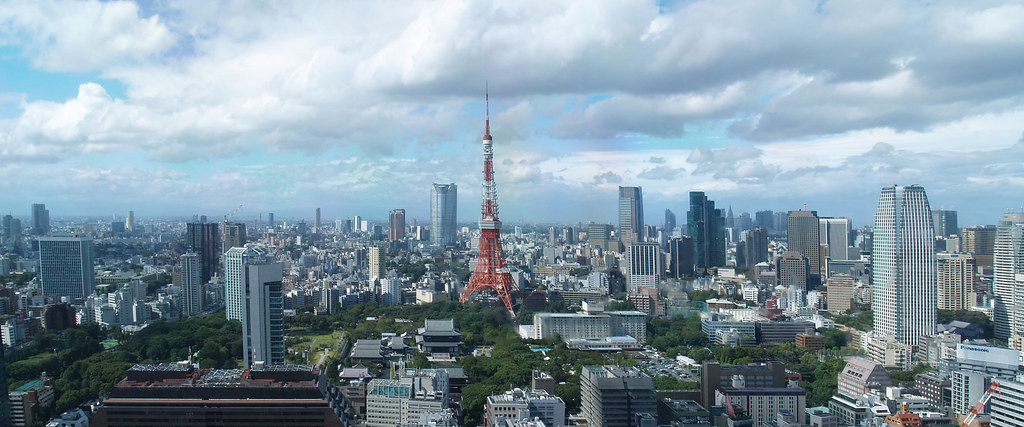
Step 1: Open all images to be merged. Browse to File > Automate > Photomerge, and click on Add Open Images. There're a few different layouts you can play with. Choose Auto for optimal results. This step may take a while to complete depending on how many images you're merging. I used the images of Tokyo Tower I took during my trip to Tokyo last year.


Step 2: Convert the resulting image to Smart Object. Browse to Layer > Smart Object > Convert to Smart Object. During this step, all the image layers generated by Photoshop are merged into one.

Step 3: Straighten object lines. Some objects in the resulting image are not exactly at the right angle due to different focal lengths used in the merging shots. To straighten them, Edit > Transform > Warp to bring up Warp tool that allows you to adjust object lines up, down, left and right. The best way to do it properly is using Grid view (View > Show > Grid) to see your horizontal and vertical lines as reference point. This step may be time consuming; however, if all your shots were taken at the same focal length on a tripod, you may not have to do much here.

Step 4: Crop image for final editing. Once you're happy with the image, you can crop it to the desired ratio. There you have it. Here's the final panoramic photo of Tokyo Tower view.
Wednesday, October 28, 2009

Olympus Stylus Tough-8000

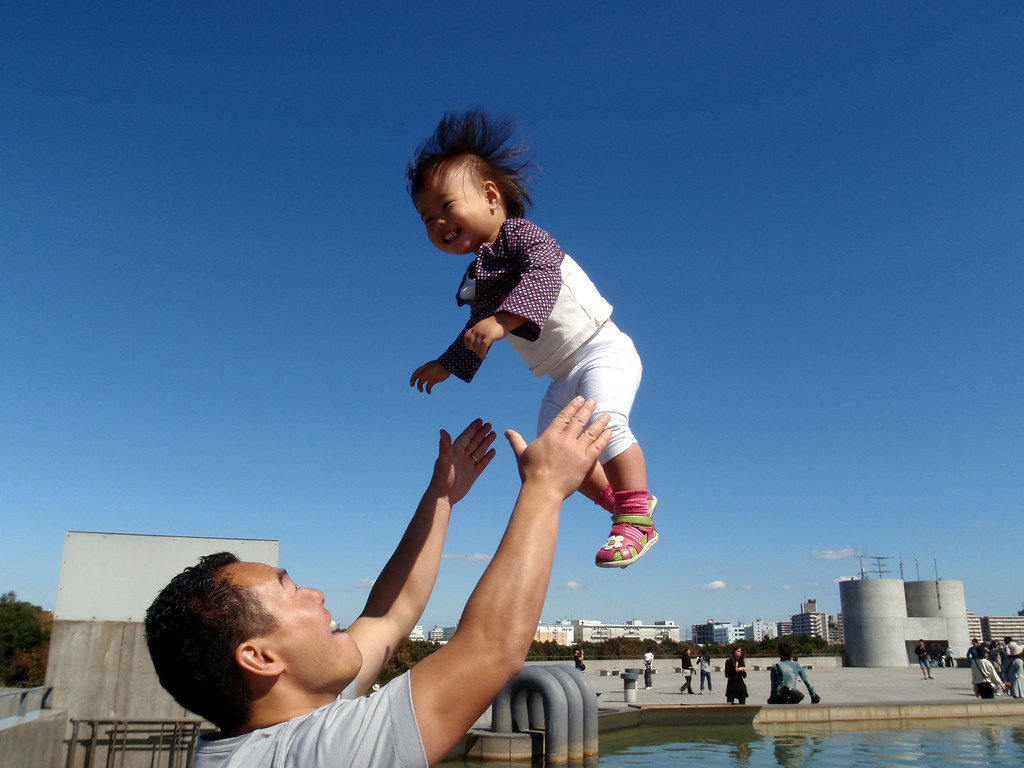
Tough-8000 is a brand new model from Olympus this year with a shockproof, waterproof, freezeproof, crushproof, and shakeproof body. I was quite impressed by the review, and got one in Akihabara, the electronic world in Tokyo. It's always convenient to have a digital camera with a smaller body. I like the fact that I can drop it, take it 10 meters under the water, or even accidentally step on it. Having a toddler who's always curious what I do with my camera, I'm not afraid to let her play with this one. I doubt she'll break Tough-8000. Best of all, it takes stunning pictures.


I'm very happy with the shutter speed of its action mode when you half-press the shutter button before the shot. With the fast shutter speed, you can capture really special moments. I took this one at Tokyo Sea Life Park when Nick was throwing Evania up in the air. They were having such a happy moment. It was so beautiful with the blue sky in the background. I just couldn't resist snapping away.

Friday, September 18, 2009

Booking Hotels for Japan

When Nick and I decided that Japan would be our next travel destination, I was excited about all the planning ahead of me. Little did I know what the real challenge would be. I had a difficult time finding the right hotels for my family.

There are very few good English online reservation engines for Japanese hotels out there. The one I would recommend to most people is Rakuten. It's easy to use, and the search results are comprehensive. Not only can you sort the results by price (most people do), but you can sort them by user rankings. However, I didn't find a good package suit for my family.

The other one I came across is Jalan.net. It provided more packages within the same hotel than Rakuten. The only downside is that it's all in Japanese. I did find an English how-to guide on Jalan.net. It was helpful, but not sufficient. It is a basic guide on how to fill out the online search form; however, the search result is of course in Japanese. The only information I could make out was the total cost. I wasn't willing to jeopardize my family's vacation stay simply based on the dollar amount. I eventually had my Japanese friend help me with booking a hotel in Sapporo. I noticed something quite interesting from booking with Jalan.net. You actually do not pay in advance. Once you make your reservation, you'll receive an email from Jalan to confirm your stay, and that's it. You won't even have to provide your credit card information. The site is operated based on trust. I know it's a bit foreign to North Americans. Believe it or not, that's how things work in Japan.

If you are willing to take a bit of risks, you can try Priceline.com, where not only can you bid on hotels, you can also bid on flights and car rentals. The risk is that you don't know which hotel you'll end up with in advance. If you are traveling with families especially with children, this is probably not the best option for you. Hence, I opted out this option.

I also compared a couple of popular ones that most people use here in Canada like Expedia.ca and Hotels.ca. For the similar packages from the same hotel, the prices are a little higher on these sites. If you are price sensitive, these are not your best bets.

Of course, it doesn't matter which online reservation engine you use, the best way to find out about a particular hotel is to read reviews by real travelers. Before I make a reservation, I always go to TripAdvisor to find out what others say about the hotel.

Things to keep in mind when making a reservation:

  • Most prices are quoted per person per night.

  • Hotel taxes and charges are included in the price.

  • Every hotel has its own cancellation policy. You should always check with the hotel.


I'll do another post on the hotels we stay for our trip, and let you know how they turn out.

Tuesday, September 15, 2009

What's new?

I have not written anything for a while, but instead have focused on caring for my little girl. I am, however, excited to be back blogging on my other two passions in life, travel and photography. I have been taking photos mostly of my daughter, as you can imagine. I will share some ideas and experiences on that subject in some upcoming posts.

I am going on a trip to Japan with my family, through the region of Sapporo and Tokyo area. This poses both as an enormous opportunity and challenge from an amateur photographer's viewpoint. Opportunity owing to the raw exotic beauty of rural and coastal landscape of Japan, presenting a intriguing canvas for capturing some unique shots. Challenge because there will certainly be a bevy of subjects worthy of pursuing yet finite amount of time at disposal.